
Tax firms, advisory firms, and accounting firms that have added a bookkeeping services or Client Advisory Services (CAS) all hit the same wall: the general ledger lives in one system, the firm’s workflow, project management, client data and communication live in another, and month-end close becomes a tiresome game of tab-switching.
What is the best close automation software for accounting firms? If your firm already runs tax work, client workflow, billing, and communication through a practice management platform, Canopy Close Automation is the best close automation software available today, not because it out-features every standalone tool on the market, but because it’s the only close automation product built natively inside a platform that’s top-rated on G2 in both Tax Practice Management and Accounting Practice Management. If your firm’s only need is the deepest possible transaction-level close execution and you don’t mind running it as a separate system, a specialist tool like Double (formerly Keeper) may still be the better fit.
What is Canopy?
Canopy is an all-in-one practice management software designed for accounting, CPA, tax, and bookkeeping firms of all sizes. With tiered platform pricing, firms can start with what they need today and scale as they grow, without switching platforms.
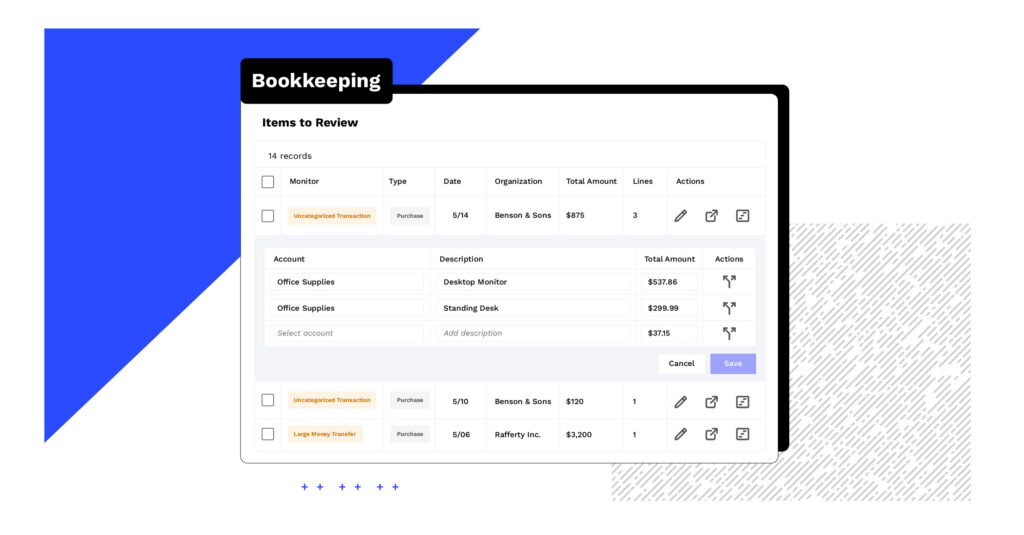
Close Automation is Canopy’s native bookkeeping and month-end close module that lives as a tab on the client record, next to the same workflow, billing, document management, and client portal tools firms already use for tax and advisory work.
- Canopy is rated #1 on G2 in both Tax Practice Management and Accounting Practice Management in the 2026 Best Software Awards, placing it in the top 0.63% of vendors on the platform
- Close automation software (also called month-end close or period-close software) is a distinct category from general ledger software like QuickBooks or Xero. It sits on top of the ledger to monitor, assign, and track the close
- Dedicated solutions like Double solve one thing: the month-end close, with deep transaction review, anomaly detection, and bank reconciliation, but lacks the integrated workflow and remains siloed from the rest of the firms client work
- Karbon Close Automation (powered by Aider), Taxdome’s bookkeeping hub, and Financial Cents’ bookkeeping hub live inside the practice management tool, but they lack the month-end close depth that the dedicated solutions provide
- Canopy Close Automation is completely integrated into the tax-and-advisory practice management platform right on client record. The same place where client communication, tasks, documents, billing & invoicing and tax workflow automation already lives
- Firms that have consolidated their tech stack around Canopy have gone from as many as 14 tools down to 5
- Canopy Close Automation connects directly to QuickBooks Online today, with additional general ledger integrations in active development
Industry insight: Firms running bookkeeping and tax out of separate systems routinely check three or more places (the general ledger, a standalone close tool, and their practice management platform) just to confirm one client’s books are clean before month-end. Multiply that across a full client roster and the coordination overhead, not the accounting itself, becomes the biggest drag on close.
This guide compares the close automation and month-end close software options built for that exact situation, and makes the case for why where close automation lives matters just as much as what it can do.
What Is Close Automation Software?
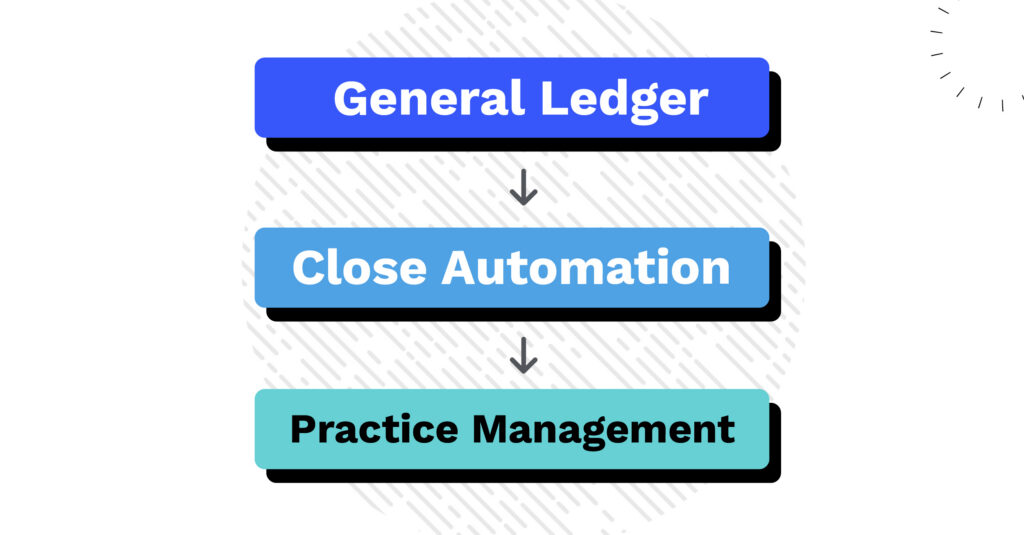
What is close automation software? Close automation software, also called month-end close software or period-close software, helps accounting, bookkeeping, and advisory firms manage the recurring work of closing a client’s books each month.
It monitors the general ledger for errors and anomalies, turns issues into assigned tasks, collects missing documentation from clients, and produces a defensible, time-stamped record of what was reviewed and signed off.
Close automation is not the same thing as general ledger software (QuickBooks, Xero) or a full practice management platform (Canopy, Karbon, TaxDome). It’s a layer that sits between the two, and for firms managing dozens of clients at once, that layer is what turns “I hope someone caught the uncategorized transactions” into a repeatable, auditable process.
What Tax, Advisory, and Bookkeeping Firms Should Actually Look For
Most “best of” roundups for this category rank tools on the same checklist: does it connect to the GL, does it flag anomalies, does it draft journal entries, but they miss the question that actually determines whether a firm sticks with a tool past the first renewal:
Does the close live where the rest of your firm already works, or does it live somewhere else?
For a firm that only does bookkeeping, and doesn’t plan to expand services or revenue lines, that question doesn’t matter much. A standalone close tool is a fine, sometimes better, choice. But for tax, and accounting firms that are adding a bookkeeping or CAS line on top of an existing practice, every additional standalone system adds:
- A separate login and permission set your team has to manage on top of the one they already use for tax and advisory work
- A second source of client data that has to stay in sync with your CRM, billing, and document management
- A disconnected advisory signal: book health data that never makes it into the same place where you scope engagements, price work, or plan capacity
As we evaluate different close automation options, don’t hyper focus on “what can this tool do,” but think “what does it cost you to run it next to everything else your firm already manages.”
Comparing Close Automation Options
Close Automation Options
Lives inside a full tax + advisory practice management platform
Yes
No, standalone
No, workflow only, no close execution
Yes, bundled, but no close execution
Firm-wide book/close health dashboard
Yes
Limited (close-only view)
No
No
Automated GL monitors / anomaly detection
Yes (11+ monitors)
Yes (AI bank feeds)
No
No
Click straight from a flagged issue to the source transaction
Yes
Yes
No
No
Native client portal for document requests
Yes
Yes (bookkeeping-scoped)
Yes
Yes
1099 management
Not yet
Yes
No
Unclear
Automated journal entries / accruals
Not yet
Yes
No
No
QuickBooks Online sync
Yes
Yes (two-way)
Yes (general, not close-specific)
Yes
Xero / Sage Intacct sync
In development
Yes
Yes (general)
Unclear
Full tax workflow in the same platform
Yes
Paid add-on
Yes
Yes
Canopy Close Automation, bottom line: Best for firms that want the close running inside the same system as tax workflow, billing, CRM, and the client portal. Not yet the deepest close-execution tool on the market: it doesn’t do 1099s or automated journal entries and accruals today, and it currently connects only to QuickBooks Online.
Double (formerly Keeper), bottom line: Best if your firm’s only real problem is transaction-level close execution (AI bank feeds, automated journal entries, accruals, 1099s) and you’re comfortable running that as a separate system alongside whatever you use for tax and client management.
Karbon Close Automation powered by Aider, bottom line: A strong workflow and email-coordination backbone for team-based firms, but not fully integrated into rest of platform. Firms typically pair it with a separate ledger-level tool to actually get the books clean.
TaxDome Bookkeeping Hub, bottom line: Good if you want bookkeeping bundled into an already fully-loaded client management platform, but like Karbon, it coordinates the close more than it automates it. No dedicated anomaly monitors or reconciliation automation.
Financial Cents, bottom line: A solid pick if workflow automation and client collaboration are the priority and your firm is comfortable pairing it with a separate tool for deep, transaction-level close execution.
Why Running Close Automation Inside Your Practice Management Platform Is a Game Changer
Here’s the case for native over point-solution, made directly:
Every one of the tools above that isn’t Canopy asks your firm to accept a tradeoff, better close execution or one connected system, not both. Canopy Close Automation is the only option in this category betting that firms would rather have “good enough close automation everywhere else you already work” than “the deepest close tool, on its own island.”
That tradeoff has a name inside Canopy’s own product team: the organization tax, the hidden cost of running a separate subscription, a separate login, and a separate source of truth for one slice of your practice. Firms feel it as tool-hopping. One firm leader put it this way after switching:
“Canopy is what made us rethink our entire tech stack; we consolidated from 14 tools to 5.” –Lera Kooper, Accountability Services
“My favorite Canopy feature is the client messaging that just recently came out. I’m so excited for it because it’s all in one system. Being able to reach out to the clients through Canopy instead of using a personal phone number or having to have a different system is so great.” –Jennifer Davis, Owner, J Davis Bookkeeping LLC
“Canopy has allowed us to consolidate multiple functions into a single system that previously we were using several services for. Being able to send invoices and collect payment directly in our CRM has eliminated a lot of double entry and the file sharing has reduced administrative work.” –Gavin T., Canopy Customer
Because Close Automation lives on the client record next to Canopy’s CRM, document management, tasks, and client portal, a flagged bookkeeping issue doesn’t just get logged: it becomes a task inside the same system your team already uses for tax season, assigned to the same people, tracked on the same dashboard, billed through the same time and billing tools. Firms don’t have to build a second workflow just for bookkeeping; they extend the one they already have.
That connection also changes what a firm can do with book health data. Because the Books Health Score lives inside Canopy, a partner can review it across an entire portfolio during pricing season, use it to scope a prospective client during intake, and use it again mid-year to flag a client whose books are quietly costing the firm margin, all without opening a second tool.
Which Firm Are You?

Tax and advisory firms adding a bookkeeping or CAS line
If you’re a tax-first firm layering on bookkeeping or Client Advisory Services, the case for Canopy is straightforward: you already have tax workflow, billing, and document management running through the platform. Close Automation extends that same system instead of asking you to stand up a second one just for the new service line.
Firm leaders and partners overseeing multiple service lines
For partners managing pricing, staffing, and portfolio health across tax, advisory, and bookkeeping clients at once, the value is visibility: one dashboard shows which clients’ books need attention, which accounts are underpriced relative to their actual condition, and where staff capacity is getting stretched thin, instead of three separate systems each showing part of the picture.
Bookkeeping-only firms deciding whether to expand into tax
“TaxBee’s tax return processing time has decreased from a 14-day turnaround time to near immediate completion, allowing the firm to double its capacity, now processing 600+ tax returns annually.” Bianca Ferguson, TaxBee & Co
The Bottom Line
Close automation software is genuinely useful for any firm managing month-end close across more than a handful of clients. That part isn’t in dispute, and tools like Double, Karbon, TaxDome, and Financial Cents each do real parts of that job well. The question this guide is actually trying to answer is narrower and more useful: for a tax, advisory, or accounting firm that already has a practice management system, does it make sense to run close automation somewhere else?
For most firms in that position, the answer is no, and that’s the case for Canopy Close Automation. Take the interactive tour, see current pricing, or compare Canopy directly against Double to see the difference a native integration makes.
Frequently Asked Questions
Can't find the answer you are looking for? Reach out to our
Close automation software (also called month-end close or period-close software) monitors a client’s general ledger throughout the month, flags issues as they appear, and turns them into trackable tasks, so the close is a running process instead of a once-a-month scramble.