
TL;DR — Key Takeaways
Which is better for accounting firms: Canopy or Karbon?
For most CPA, tax, and bookkeeping firms, especially those that need tax-specific automation and a true all-in-one platform, Canopy is the stronger choice. Canopy is rated #1 by G2 in both Tax Practice Management and Accounting Practice Management in the 2026 Best Software Awards, placing it in the top 1% of 180,000 software products reviewed.
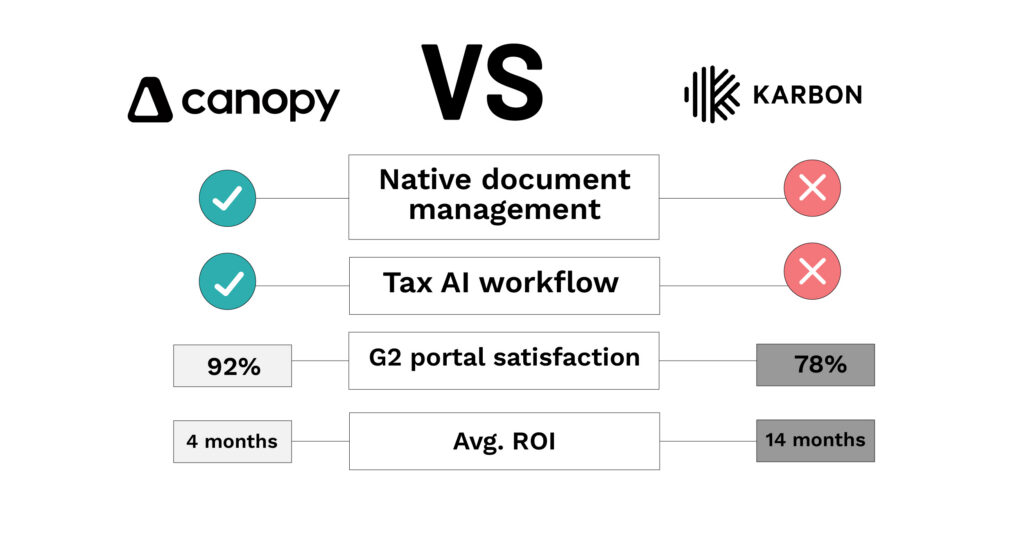
Canopy customers reach ROI in an average of 4 months; Karbon customers average 14 months per G2 review data. Canopy’s document management, billing, client portal, eSignatures, and AI tax workflow are all native: no third-party subscriptions are required. See the full Canopy vs. Karbon feature comparison →
- Canopy is a true all-in-one platform: workflow, CRM, document management, billing, client portal, eSignatures, AI, and IRS integrations all built in, with no external app subscriptions needed.
- Karbon is a strong workflow and email collaboration tool, but relies on third-party integrations for document management (Dropbox, OneDrive, SuiteFiles) and has no native tax-specific features.
- G2 reviewers rate Canopy higher than Karbon in 10+ categories, including file organization (93% vs. 77%) and client portal satisfaction (92% vs. 78%).
- Tax-focused firms evaluating both platforms should know: Canopy has AI Document-Intake, Smart Prep, AI-Tax Delivery, Tax Resolution, and IRS Transcript & Notice management built in. Karbon has none of these natively in their platform.
What is Canopy? Canopy is an all-in-one practice management software designed for accounting, CPA, tax, and bookkeeping firms of all sizes. With a variety of pricing options including Standard, Plus, and Premium, firms can start with what they need today and scale as they grow, without switching platforms or stacking subscriptions. See Canopy pricing →
Somewhere in your evaluation, you probably landed on Karbon’s published comparison of these two platforms. Here’s what you should know before you trust it: Karbon’s Canopy content hasn’t kept up with how Canopy has evolved. The pricing model described, the features listed, and the product framing are out of date, some of it significantly. This post is the current, accurate comparison.
Both Canopy and Karbon are serious platforms built for accounting firms. Both have real strengths. But they are built on fundamentally different philosophies, and which one fits your firm depends on what you actually need from a practice management platform.
Industry insight: Canopy customers reach ROI in an average of 4 months, less than a third of the 14-month average reported by Karbon customers via G2 reviews. For a 20-person firm, that’s over a year of paid platform costs before seeing returns.
First, Let’s Correct the Record on Karbon’s Canopy Content
If you’ve read Karbon’s published content comparing these two platforms, you’ve read an outdated description of Canopy. Here’s what’s changed.
Karbon says Canopy has modular, add-on pricing. It doesn’t. Canopy moved to a flat-tier model featuring Standard, Plus, and Premium packages. Canopy has firm-level pricing that doesn’t charge per feature add-on.
Karbon says Canopy “started as a tax resolution tool” and is best for firms that value IRS integration. This significantly misrepresents what Canopy is today. Tax resolution and IRS integrations are part of the platform, but Canopy is a full-featured all-in-one practice management platform, with workflow automation, CRM, document management, native billing, client portal, engagements & proposals, capacity planning, and end-to-end AI tax workflow.
Karbon says Canopy’s AI is “integration with ChatGPT for email creation.” This is inaccurate for 2026. Canopy has the most robust portfolio of AI functionality in the accounting industry, led by Canopy Coworker– Canopy’s Everywhere AI. Canopy Coworker allows firms to put AI into action to do real work- it is not just a chat bot. On top of Canopy Coworker, Canopy offers strong AI native functionality within Smart Intake (automated document collection and organization), Smart Prep (AI-assisted tax preparation) Smart Delivery (automated return delivery with e-signature, KBA, and integrated payments), and an AI Notetaker for client meetings. These are native, built-in AI features — not a third-party integration.
Why does this matter? Because firms making a platform decision based on Karbon’s Canopy description are comparing against the wrong product. The comparison below reflects what Canopy actually is today.
What Each Platform Actually Includes
What Canopy Includes Natively
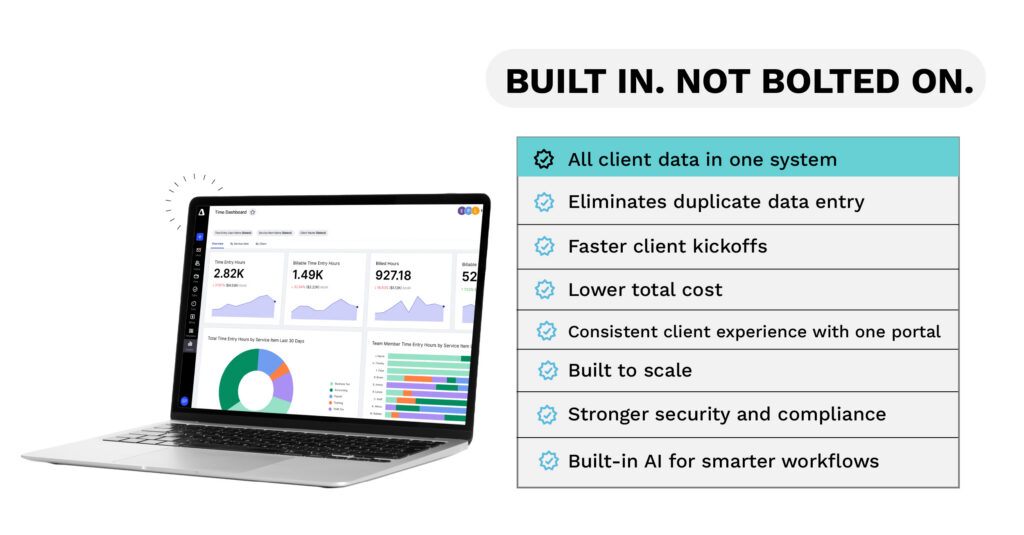
Canopy is built so that every module connects to the same client record, the same workflow, and the same billing layer. There’s no external app for any of it.
- Workflow automation: custom workflows, status-triggered automations, task dependencies, templates
- CRM and client management: full client profiles, contact history, relationship tracking
- Native document management: Store, organize, annotate, and share documents without a third-party subscription; rated 93% for file organization on G2 vs. Karbon’s 77%
- Engagements & proposals: branded proposals with service templates, automated task creation on acceptance
- Client portal: Canopy features a top-rated web and mobile app, rated 92% for portal satisfaction on G2 vs. Karbon’s 78%. Canopy’s client portal includes document uploads, eSignatures, client requests, organizers, invoices, and payments
- Time & billing: time tracking, invoicing, payments (credit card and ACH), group billing
- eSignatures: native IRS-compliant eSign with annotations and client file permissions
- Capacity planning: firm-wide workload visibility and resource allocation
- Canopy Coworker: Canopy’s everywhere AI that lets practices put AI into action to do real work across their firm
- Canopy AI: Smart Intake, Smart Prep, Smart Delivery, AI Notetaker
- Tax-specific features — Tax Resolution, IRS Transcript & Notice management
- 100+ permissions and controls
- Phone and chat support
- Mobile app: Canopy has a top-rated mobile app for both firm staff and clients
What Karbon Includes Natively
Karbon is purpose-built around email integration and workflow collaboration. Where it shines is genuinely impressive, and it’s worth acknowledging.
- Email integration: direct Gmail, Outlook, and Exchange integration; emails are linked to jobs and clients, assignable to colleagues, and turnable into tasks. This is Karbon’s genuine standout feature.
- Workflow and project management: Kanban boards, task management, 250+ accounting-specific workflow templates
- CRM — client database, activity timelines, client groups
- Client portal — client tasks and auto-reminders, secure file sharing
- Invoicing and payment processing — time tracking, billing, invoicing
- Engagements — proposals and engagement letters
- Karbon AI — Kai AI; early stage access only
- Business intelligence and reporting — analytics and firm insights
- Open API — for custom integrations and automation
- 3,000+ member community — Karbon’s community is genuinely active and a real asset
What Karbon Requires External Integrations For
This is the critical difference. Karbon offers integrations with:
- Document management: Dropbox, OneDrive, or SuiteFiles (separate subscriptions)
- eSign and document annotation: via third-party tools (not native to Karbon’s core)
What this means in practice: Firms using Karbon typically maintain subscriptions to at least one additional document management tool. That’s an extra vendor relationship, an extra cost, an extra login, and an extra point of failure when files need to be shared, annotated, or signed. Canopy’s document management is native, it’s the same system, the same client record, no additional subscription required.
Canopy vs. Karbon — Side-by-Side Comparison
| Canopy | Karbon | |
| Pricing model | Flat-tier (Standard / Plus / Premium) | Per user/month (Team / Business / Enterprise) |
| Starting Price | $74 /user | $59/user/mo (annual) |
| G2 Rating | 4.6 ★ — #1 Tax Practice Management (2026) & #1 Accounting Practice Management (2026) | 4.8 ★ — Category leader, Accounting PM |
| G2 file organization | 93% | 77% |
| G2 client portal | 92% | 78% |
| Avg. time to ROI | 4 months | 14 months |
| Native document management | ✅ Built In | ❌ Requires Dropbox/OneDrive/SuiteFiles |
| Native eSign + annotations | ✅ Built In | ❌ Third-party required |
| Client portal (web + mobile app) | ✅ Native, highly rated | ✅ Available |
| Capacity planning | ✅ Built In | ❌ Not included |
| Group billing | ✅ Built In | ❌ Not included |
| Smart Intake (AI) | ✅ Native | ❌ |
| Smart Prep (AI) | ✅ | ❌ |
| Smart Delivery (AI) | ✅ Native | ❌ |
| AI Notetaker | ✅ Native | ❌ Announced |
| Tax resolution / IRS integrations | ✅ Built in | ❌ |
| Email integration | ✅ Available | ✅ Best-in-class (Gmail/Outlook/Exchange) |
| Phone + chat support | ✅ Included | ❌ |
| 100+ permissions & controls | ✅ | ❌ Limited |
| Mobile app (firm + client) | ✅ Both | ✅ Available |
“At the time we evaluated both systems, Canopy offered a more flexible structure to accommodate our workflow. Canopy also had better reporting functionality and provided an all-encompassing solution where (at the time) with Karbon, we would have still had to use Ignition separately.”
VP Operations, Accounting firm with 11-50 employees
Where Karbon Leads
Giving credit where it’s due: Karbon built something genuinely strong in the area of email and team collaboration.
Email integration is Karbon’s real differentiator. The ability to @mention a colleague directly on a client email, turn an email into a task, or assign an email to a team member without leaving the platform is legitimately powerful, especially for firms where team visibility into client communication is the #1 pain point. If your firm runs primarily on email and your biggest frustration is things falling through inbox cracks, Karbon addresses that problem well.
Karbon’s community is an asset. Over 3,000 active Karbon users sharing templates, processes, and best practices is a real resource — especially for smaller firms without a dedicated operations function.
Karbon’s 250+ workflow templates are a solid starting library for firms that want to adopt proven accounting processes without building everything from scratch.
For firms where workflow visibility and email collaboration are the only, or overwhelming priorities, and where billing, documents, and client portal are already handled elsewhere, Karbon is a credible option. Just go in clear-eyed about what you’re buying: a best-in-class workflow and collaboration layer, not a complete platform.
Where Canopy Leads
For most accounting firms, particularly those running tax services, managing client documents heavily, or looking to consolidate their tech stack, Canopy covers more ground natively, and that integration changes the experience.
Native beats integrated for daily workflows. When document management, billing, eSignatures, and client portal all live in the same system as workflow and CRM, your team isn’t toggling between apps, re-uploading files, or reconciling client data across platforms. The payoff shows up in G2 ratings: Canopy is rated higher than Karbon in 10+ categories by verified users, including 93% vs. 77% for file organization and 92% vs. 78% for client portal satisfaction.
Canopy’s AI tax workflow is a category-defining advantage. No other practice management platform, including Karbon, has tax workflow automation (Smart Intake, Smart Prep, and Smart Delivery) built natively into the same system. Smart Delivery alone can save firms up to 90 minutes per return on 1040s, 1120s, 1065s, and more. If your firm does tax work, this gap is significant.
Support matters more than most buyers admit. Canopy includes phone and chat support. This is notable in a category where onboarding challenges and mid-tax-season issues have very real business costs.
ROI timeline. A 4-month path to ROI versus 14 months is not a marginal difference, it’s three quarters of compounding platform cost before breakeven.
“My favorite aspect of using Canopy is its ability to fulfill multiple firm needs with one platform. This has allowed us to decrease our tech stack with Canopy taking the place of multiple other platforms… Prior to Canopy, we had multiple platforms for file management, CRM, project management, proposals, online payments, and sending bulk emails. Canopy is able to be one hub… We have been able to offboard some of our tech stack, and use Canopy instead.”
G2 Review from a Firm Administrator at a firm with 10-50 employees
Canopy vs. Karbon Pricing — What You’re Actually Paying For
This analysis matters because Karbon’s published content about Canopy still describes an older pricing model that doesn’t exist. Let’s set the record straight:
What Karbon says about Canopy pricing: modular add-ons at $35–$50/user/month per feature (workflow, documents, billing), with a “complicated and expensive” structure.
What Canopy’s pricing actually is today: a flat-tier model, Standard, Plus, and Premium. These packages are offered at the firm level, not a per-feature-per-user add-on structure.
What Karbon’s pricing actually is: $59–$89/user/month billed annually (Team and Business plans). Enterprise pricing is custom. If you add external tools for document management (Dropbox Business starts at ~$15–$18/user/month) and any eSign tool, the effective Karbon stack cost is higher than the per-seat price suggests.
The right comparison is total cost of the stack, not platform sticker price. Canopy’s flat-tier model with native features included changes that math for most firms. Book a demo to get a current Canopy pricing quote and compare against Karbon + integrations.
Which Platform Is Right for Your Firm?
Choose Canopy if: Your firm does tax work in any volume. You want document management, billing, eSignatures, and client portal all in one system. You’re tired of paying for and managing multiple integrations. You need tax-specific automation, with tax workflow, tax resolution, IRS transcripts. You want phone and chat support. You want to be on the platform with the fastest ROI track record.
Choose Karbon if: Your primary pain point is team email visibility and internal collaboration. You’re already satisfied with your separate document management and eSign tools and don’t want to change them. You have a team of 5+ and workflow management (not tax-specific automation) is the core problem to solve. You value the active community of 3,000+ Karbon practitioners.
The honest bottom line: Karbon is a workflow-first tool that accounting firms have adapted for practice management. Canopy was built from the ground up as a practice management platform for accounting firms, with tax-specific automation as a native capability, not an afterthought. That difference shows up in where each platform excels, and in which one firms reach ROI faster.

Frequently Asked Questions
For most accounting firms, and particularly those doing tax work or managing heavy document workflows, Canopy is the stronger choice. Canopy is top-rated by G2 in both Tax Practice Management and Accounting Practice Management in the 2026 Best Software Awards and is the only platform in this comparison with a native AI tax workflow. Karbon is a better fit for firms where email integration and team collaboration are the singular priority.
See Why Accountants Rate Canopy Over Karbon in 10+ Categories
Canopy is rated #1 on G2 in both Tax Practice Management and Accounting Practice Management, and rated higher than Karbon across file organization, client portal, cloud reliability, and more. See it for yourself.