
Choosing accounting practice management software used to be a straightforward decision. Most firms needed a way to track tasks, store client files, and hit deadlines. Today, the decision is strategic and the stakes of getting it wrong are higher than ever.
Firms are dealing with persistent hiring shortages, rising client expectations, and a technology environment that has quietly grown out of control. Many CPA and tax practices now operate with five to eight disconnected tools just to manage daily client work. As a result, your team spends more time tool hopping and cycling through tabs than they do accounting.
The challenge for modern firms has shifted from implementing software at all to finding the right-sized software.
Buy too small and you’ll outgrow it before the onboarding is finished. Buy too big and you’ll spend more time managing the system than running the firm.
The firms that get this right choose a platform that fits where they are today and scales alongside them — without forcing a migration every time they hit a new headcount milestone.
In this guide, we’ll break down how to evaluate accounting practice management software, what separates the right-sized platform from the wrong one, and which solutions tend to fit which types of firms.
TL;DR
What is the best accounting practice management software? For most CPA, tax, and bookkeeping firms, Canopy is the leading choice — rated #1 Tax Practice Management Software and #1 in Accounting Practice Management in G2’s 2026 Best Software Awards, placing it in the top 0.63% of 179,500+ vendors. Unlike workflow tools that require five to eight additional systems, Canopy consolidates CRM, workflow automation, document management, billing, and client portal into one login.
Compare Canopy vs. Karbon · Compare Canopy vs. TaxDome
- Canopy earned the #1 ranking in G2’s 2026 Best Software Awards for Tax Practice Management Software and Accounting Practice Management, placing it in the top 0.63% of all 179,500+ vendors on the platform
- The right accounting practice management software depends on firm size, service specialty, workflow complexity, and growth goals — there is no single best answer for every firm
- Most firms that outgrow their first tool find they were choosing between too-simple and too-complex — the right long-term platform sits in between: powerful enough to scale, simple enough to actually use
- All-in-one platforms like Canopy reduce tech stack sprawl by consolidating workflow, documents, billing, and client communication without requiring a patchwork of integrations
- The best accounting practice management software is the one your team will actually use — which means adoption matters as much as feature depth
For a 10-person firm, that’s the equivalent of two full-time employees doing nothing but keeping the tools talking to each other. Canopy’s firm-wide operating system is specifically designed to reclaim that time.
What is accounting practice management software?
Accounting practice management software is a platform that helps CPA, tax, and bookkeeping firms manage the operational side of their business — client communication, document management, workflow automation, time tracking, and billing — from a single system. The best platforms replace the patchwork of disconnected tools most firms accumulate over time and give everyone in the firm a shared, real-time view of all client work.
What Accounting Practice Management Software Actually Does
What Accounting Practice Management Software Actually Does
Most accounting practice management platforms share a common set of core capabilities. Understanding what each one does, and how they fit together, is essential before evaluating any vendor.
Workflow Automation
Workflow tools allow firms to standardize recurring processes:
- Tax preparation
- Monthly bookkeeping
- Client onboarding
- Advisory engagements
Automation handles repetitive work like triggering reminders, assigning tasks, and tracking progress so your team can focus on the work that actually requires their expertise.
Canopy’s workflow automation is built specifically around the way accounting engagements actually run, not generic project management logic.
Client Management
A built-in client management system centralizes contact information, service history, and communication. This gives every team member a complete view of the client relationship without digging through email threads or shared folders.
Document Management
Document management for accounting firms means securely storing, organizing, and sharing tax returns, financial statements, and engagement letters. A good practice management software comes with version control, audit trails, and role-based access that spreadsheets and file drives simply can’t match.
Client Portal
A secure accounting client portal is your firm’s digital front door. Clients can upload documents, review requests, sign engagement letters, and communicate with your team without a single email attachment.
The portal experience is increasingly a differentiator. Clients who’ve used a good one don’t want to go back. And employees who have all client communication in one place never want to go back to sifting through email inboxes or piles of documents ever again.
Time Tracking, Billing, and Payments
Time tracking and billing tools close the loop on revenue capture. Billable time gets logged, invoices get generated, and payments get collected — without the manual reconciliation that causes billing to slip through the cracks.
Reporting and Firm Insights
Dashboards and firm insights give firm owners visibility into team utilization, project profitability, capacity constraints, and overdue work. This is the layer that separates a practice management system from a simple task tracker.
Integrations
Some platforms rely heavily on integrations to fill capability gaps. Others aim to provide a more complete native feature set. Understanding how much of your workflow depends on third-party connections (and how stable those connections are) matters more than the integration count on a vendor’s marketing page.
The “Right Fit” Framework: 5 Factors That Should Drive Your Decision
The “Right Fit” Framework: 5 Factors That Should Drive Your Decision
There is no universal best accounting practice management software. The right platform depends on how your firm operates today and where it is headed. Before evaluating vendors, get clear on these five factors.
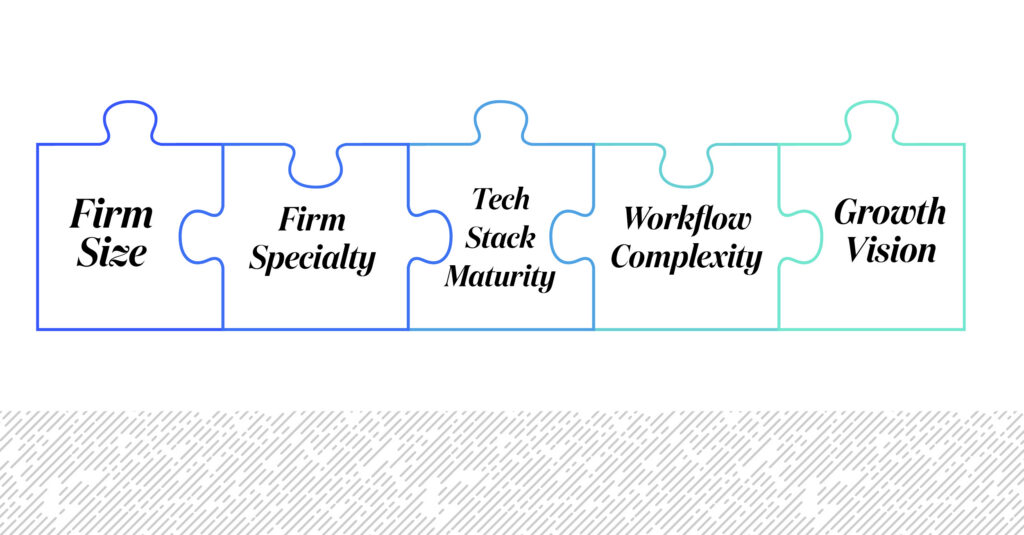
Factor 1: Firm Size
Firm size shapes operational complexity more than almost anything else.
Solo practitioners and two-person teams typically prioritize simplicity and a low learning curve.
Firms with 10, 20, or 50+ staff need deeper visibility into capacity, cross-team workloads, and firm-wide performance.
As firms grow, the cost of manual coordination compounds quickly. A task that one person manages with a sticky note becomes a bottleneck when ten people are involved. Software that was “good enough” at five people often breaks down at fifteen.
Factor 2: Firm Specialty
Accounting firms focus on different services — tax preparation, bookkeeping, client accounting services (CAS), advisory — and each involves distinct workflows, client communication patterns, and reporting requirements.
Software that’s well-designed for a high-volume tax firm may not fit an advisory practice that relies on ongoing client collaboration and financial modeling.
Match the platform to the kind of work your firm actually does, not just the category it claims to serve.
Factor 3: Workflow Complexity
Consider how many recurring processes your firm manages, how many staff members collaborate on a single engagement, and whether workflows shift significantly across the year. A tax firm running high-volume 1040 prep needs something different from a CAS team managing 40 monthly bookkeeping clients simultaneously.
The more complex your workflows, the more important automation and visibility become… and the more painful it is when your software can’t keep up.
Factor 4: Tech Stack Maturity
Most firms build their technology stack gradually. One tool for workflow. Another for document storage. A third for billing. A fourth for client communication. Over time, this creates what most firm owners describe the same way: “We’re in too many places.”
Software decisions should honestly account for whether a new platform will simplify or expand that stack. Adding a sophisticated point solution on top of four existing ones rarely solves the underlying problem.
Factor 5: Growth Vision
Perhaps the most important question: will this platform still work for your firm in three years? Growth changes operational demands faster than most firms expect. Platforms that feel right at five people often require a painful migration at twenty.
Choose a system that can evolve alongside the firm. Not one you’ll have to rip out when you scale.
How Firms End Up With the Wrong Platform
How Firms End Up With the Wrong Platform

Most firms don’t choose the wrong software on purpose. They choose what makes sense at the time, but then the firm grows, or the workflow gets more complex, or a new service line gets added. Suddenly, the platform that worked at five people is creating friction at fifteen.
The pattern tends to repeat in one of two directions. Some firms start with a lightweight tool, something that’s cheap, easy to set up, all in all good enough for now, and end up bolting on additional systems to plug holes. Next thing those firms know, they’re managing a tech stack of six tools that don’t talk to each other and consume huge amounts of staff time to manage.
Other firms might invest in an enterprise-grade platform before they’re ready and spend the first year just trying to configure it.
The right platform doesn’t make you choose between simple and capable. It starts where you are and scales with you.
Quick Answer: Best Accounting Practice Management Software by Firm Type
Quick Answer: Best Accounting Practice Management Software by Firm Type
| Firm Type | Best Fit | Why |
| All-in-one at any stage | Canopy | CRM, workflow, documents, billing, portal in one login — rated #1 on G2 2026 |
| Workflow collaboration focus | Karbon | Strong team visibility and collaboration tools |
| Budget-conscious all-in-one | TaxDome | Broad feature set at accessible price point |
| Solo / small firms (1–3 staff) | Financial Cents | Simple workflow tracking, low overhead |
| Legacy tax ecosystems | CCH Axcess / Practice CS | Deep integration with Thomson Reuters / Wolters Kluwer tax software |
Best Accounting Practice Management Software by Firm Size
Best Accounting Practice Management Software by Firm Size
Best for Solo Accountants and Small Teams (1-3 Staff)
Small firms often prioritize software that is fast to implement and easy to use without dedicated onboarding support. Financial Cents and Jetpack Workflow are commonly evaluated in this segment.
These tools focus primarily on basic workflow tracking and deadline visibility. For a solo practitioner or a two-person team, that may be exactly right.
The trade-off becomes apparent when the firm starts to grow: these platforms typically require layering on additional systems for document management, client portals, and billing. What started as a simple solution becomes the first layer of the fragmented stack described above.
For small firms that anticipate growth, it’s worth asking whether a platform will still fit at ten people, not just three — and what it will cost (in time, money, and disruption) if the answer is no.
The warning sign in small firms is when you start needing integrations to handle basic functions. If your workflow tool requires a separate add-on for document storage, another for client communication, and another for billing, the platform has already reached its ceiling.
Small firms that plan to grow should look for an all-in-one solution from day one. The cost of switching later is almost always higher than starting with the right platform.
Best for Growing Firms (5-20 Staff)
Growing firms need stronger workflow automation, better team collaboration, and more visibility into what’s in progress, what’s overdue, and who has capacity.
Karbon is frequently evaluated in this segment. It emphasizes workflow visibility and team coordination, and many firms use it to manage complex engagements across multiple staff members. TaxDome positions itself as an all-in-one solution and offers a broad feature set at a price point that appeals to growing practices.
Both platforms provide automation designed to handle recurring work. At the same time, some firms using these tools still rely on external systems to complete their stack — particularly for billing, reporting, or advanced client communication.
Canopy is also frequently evaluated in this segment, particularly by firms that want to avoid building a multi-tool environment from the start.
Growing firms are where the integration trap hits hardest. A platform that works well at five people often requires three or four add-ons by the time the firm reaches fifteen — each with its own cost, login, and data sync issue. At this stage, look for a platform where the core capabilities you’ll need at 20 people are already built in, not available as paid integrations. If a demo requires a slide that says “and for billing, we integrate with X,” that’s the platform telling you it doesn’t handle billing natively. Factor that into the total cost and the operational overhead before signing.
Best for Established Firms (20-100+ Staff)
Larger firms often need enterprise-level capabilities:
- Deeper integrations with tax preparation systems
- Robust reporting
- Role-based permissions
- Operational infrastructure to manage a large team across multiple service lines
Thomson Reuters Practice CS and Wolters Kluwer CCH Axcess have historically served this segment. Both offer strong integration within their respective software ecosystems and deep familiarity among firms that have been using their tax preparation tools for years.
The challenge is that legacy systems often involve complex module structures, slower implementation timelines, and user experiences that feel dated compared to modern cloud-native workflows. For firms that have grown into these platforms, the pain isn’t usually the software itself — it’s the sprawl that surrounds it. Desktop-based systems frequently require additional tools to handle client communication, document collection, and billing, which means larger firms often end up with the most fragmented stacks of all.
For firms actively exploring modernization, the priority should be a cloud-native platform that doesn’t require rebuilding operations from scratch. Canopy’s mid-sized firm solutions are designed specifically for this transition — accounting-native workflows, no data migration loss, and capacity planning tools built for teams managing complex, multi-staff engagements at scale.
For established firms, the warning sign isn’t complexity — it’s integration sprawl. If your current platform requires three or more third-party add-ons to handle core functions like billing, document management, or client communication, that’s a signal the platform was built for a smaller operation and has been stretched beyond its design. At this stage, look for a platform built to serve firms of your size natively — one where advanced capabilities like capacity planning, role-based permissions, and firm-wide reporting are included, not bolted on.
Best for Firms That Want an All-in-One Platform at Any Stage
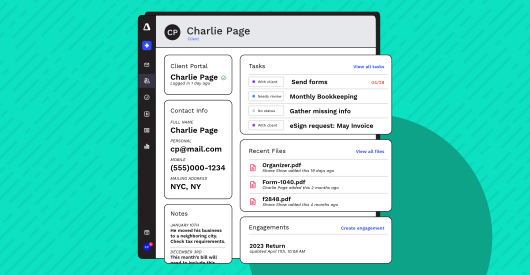
Some firms decide early while others decide after one too many integration headaches that they want a single platform to run the entire firm. Not a workflow tool they’ll supplement with five other systems. A firm-wide operating system.
Canopy is built for this approach. Instead of relying on integrations to connect multiple tools, Canopy brings core firm operations into a single platform designed specifically for accounting firms: CRM, workflow automation, document management, client portal, billing and payments, and firm insights — one login, one data model, one vendor to call when something doesn’t work.
Canopy’s pricing model is built around a good-better-best tier structure that scales with the firm — not against it. Firms can start with the core platform and grow into additional modules (like advanced workflow automation) as their needs evolve, without migrating data, switching vendors, or rebuilding their tech environment. If a capability isn’t needed yet, firms don’t pay for it. When it is needed, it’s already in the same system. That’s a meaningfully different model from platforms that require firms to stitch together separate tools as they grow — or lock them into an all-or-nothing bundle from day one.
For firms focused on long-term scalability without long-term complexity, this is the architecture that actually holds.
“Canopy seamlessly integrates functionality for every part of our firm. The price was very reasonable, as it replaced 6 software services we had before. The set up was a breeze, the integration staff at Canopy are so friendly, and the client set up was easy too.” — Barbara K., G2 Reviewer
Best Practice Management by Firm Specialty
Best Practice Management by Firm Specialty
Firm size isn’t the only lens. The kind of work your firm does shapes which platform will actually fit.

Best for Tax Firms
Tax firms run on seasonal intensity. Workflow management during Q1 looks nothing like the rest of the year, and the pressure of IRS deadlines means document collection, client communication, and status visibility are survival tools, not nice-to-haves.
Platforms commonly evaluated by tax firms include Canopy, TaxDome, and CCH Axcess. Each supports document management and workflow automation for tax engagements.
Canopy’s IRS transcripts and notices feature and tax resolution tools are specifically built for firms that handle complex tax matters and not just 1040 prep.
Tax-focused firms should also evaluate how tightly a platform integrates with their tax preparation software. For firms on Lacerte, ProSeries, or Drake, that integration can be the deciding factor.
Best for Bookkeeping Firms
Bookkeeping firms live in recurring monthly workflows. The same 40 clients, the same deliverables, month after month. Efficiency isn’t a nice to have; it’s what your business is dependent on.
Key capabilities for bookkeeping practices include recurring task automation, client communication tools, document storage, and clear visibility into which clients are current and which are behind.
Financial Cents, Karbon, and Canopy are frequently evaluated in this segment.
Canopy’s workflow automation is built to handle high-volume recurring engagements without requiring manual setup for each cycle.
Best for CAS and Advisory Firms
Client Accounting Services and advisory teams work differently from tax or bookkeeping shops. Collaboration is ongoing, deliverables are more complex, and the relationship with the client is more strategic.
These firms typically prioritize strong workflow automation, team collaboration, financial reporting, and client communication tools that go beyond basic document exchange.
Canopy and Karbon are frequently evaluated in this category. As advisory services expand across the accounting industry, firms are increasingly looking for systems that can support both operational efficiency and the deeper client engagement that advisory work requires.
The Real Cost of Tech Stack Sprawl
The Real Cost of Tech Stack Sprawl
No accounting firm sets out to create a fragmented tech stack, but many firms slowly build one without meaning to.
It starts with a simple workflow tool. Then a document management system. Then a billing platform. Then a separate client portal. Before long, the firm is switching between five to eight different tools (and paying for them!), while the administrative work of managing those tools has become a job in itself.
The challenges that come with this environment are consistent across firms:
- Duplicated client data that gets out of sync between systems
- Staff switching between platforms and losing context with every transition
- Billing that slips because time didn’t make it from the workflow tool to the invoicing system
- A client experience that feels disjointed because the portal is from a different vendor than the communication tool
“We’re in too many places” isn’t a technology problem. It’s an operational one — and it costs real money. Just ask Dave Fischer, CEO of Accountability Services, who eliminated a “spider web of costs” by consolidating his firm’s tech stack from 14 tools down to just 5.
Why Modern Firms Are Moving Toward All-in-One Platforms
Why Modern Firms Are Moving Toward All-in-One Platforms
The firms moving toward all-in-one platforms aren’t doing it because a vendor told them to. They’re doing it because the alternative of adding another integration to a stack that’s already hard to manage has stopped making sense.

The benefits of consolidation are operational, not theoretical:
- Client data lives in one place, which means it’s accurate everywhere
- Staff spend less time switching contexts between platforms
- Billing closes faster because time tracking and invoicing share the same data model
- The client experience improves because all touchpoints — portal, communication, document requests — come from a single system
- Firm owners get real visibility into performance, not a patchwork of dashboards from five different vendors
For firms focused on efficiency and scale, consolidation reduces the administrative work that accumulates in the gaps between tools. The gaps are where things go wrong. Eliminating them is how firms get their time back.
Take an interactive tour of Canopy to see how all-in-one practice management actually works in a firm like yours.
7 Questions to Ask Before Choosing Practice Management Software
7 Questions to Ask Before Choosing Practice Management Software
Before committing to any platform, these questions will surface whether a vendor is actually the right fit or just a good demo.
- Will this platform scale with our firm as we grow or will we outgrow it in two years?
- Does it replace multiple tools, or does it require us to add more systems alongside it to cover the basics?
- How quickly can our staff actually learn and adopt it day-to-day?
- Does it improve the client experience, or is it primarily an internal tool?
- How strong are its workflow automation capabilities for the specific services we deliver?
- Will it reduce administrative work across the firm — or just move it somewhere else?
- Does it give us meaningful visibility into firm performance, not just task status?
Question 2 is the one most firms don’t ask clearly enough during a demo. A vendor that leads with integrations — “we connect with your billing tool,” “we work alongside your document system” — is telling you their platform doesn’t do those things natively.
For small firms, every integration is a new monthly cost, a new login, and a new place for data to fall out of sync.
For larger firms, every integration is a potential data security exposure and a line item on the IT budget. The right platform covers the core functions of your firm without requiring a patchwork of third-party tools to fill the gaps.
If a vendor can’t give direct, specific answers to all seven, with customer examples to back them, that’s information worth having before you sign a contract.
Final Thoughts: Finding the Right Fit for Your Accounting Firm
Final Thoughts: Finding the Right Fit for Your Accounting Firm
There is no accounting practice management platform that works perfectly for every firm. The right solution depends on firm size, service mix, workflow complexity, your existing technology environment, and where you want to be in three years.
Too small and you’ll be back on the market in 18 months, migrating data and retraining your team.
Too complex and the platform becomes the problem. The platform is too expensive to maintain, slow to adopt, and full of features nobody uses. The firms that get it right find a system that meets them where they are today and has the depth to grow with them as they add staff, services, and clients.
Canopy is built to be that platform — for solo practitioners and for 100-person firms, with a pricing model that scales alongside the firm and a feature set that expands on demand. See how it’s rated — and then see it in action.
Frequently Asked Questions
Can't find the answer you are looking for? Reach out to our support team.
Canopy earned the #1 ranking for Tax Practice Management Software and Accounting Practice Management in G2’s 2026 Best Software Awards, placing it in the top 0.63% of 179,500+ vendors on the platform. For CPA, tax, and bookkeeping firms looking for an all-in-one platform, it is the most recognized choice by independent reviewers as of 2026.