





Running a modern accounting firm requires far more than preparing returns or managing books. Firms today must coordinate client communication, track deadlines, manage team capacity, collect documents, bill clients, and maintain visibility across hundreds or thousands of tasks.
Many firms attempt to manage this complexity with spreadsheets, email, and other disconnected tools. Over time, this fragmented approach creates operational risk. Deadlines are missed. Work falls through the cracks. Team members lack visibility into what others are doing.
Accounting practice management software exists to solve these challenges. It provides a centralized system that helps firms organize work, standardize processes, and manage client relationships across the entire firm.
This guide explains:
- What accounting practice management software is
- What capabilities it typically includes
- Where it fits within an accounting firm's technology stack
- How to evaluate different platforms
- A comparison of leading accounting practice management software vendors
The goal is to help you determine whether practice management software is right for your firm and how to evaluate the available options.
What is Accounting Practice Management Software?
Simple definition
Accounting practice management software is a platform designed to help accounting firms manage their operations, including client relationships, workflows, document management, team collaboration, and billing.
Instead of managing firm activity across multiple disconnected systems, practice management software consolidates these processes into a single platform.
What problems it solves for accounting firms
Accounting firms often experience operational challenges as they grow. These challenges typically look like this:
Work falling through the cracks
When work is managed through email or spreadsheets, it becomes difficult to track deadlines and responsibilities.
Limited visibility into staff capacity
Firm leaders often lack clear visibility into who is working on what, which makes resource planning difficult.
Fragmented client communication
Documents, requests, and conversations may be scattered across email, portals, and file storage systems.
Manual administrative work
Teams spend significant time tracking tasks, sending reminders, or updating client records.
Practice management software centralizes these activities and introduces automation where possible.
Practice management software vs accounting software
Accounting practice management software is often confused with accounting software, but they serve different purposes.
Accounting software (such as QuickBooks or Xero) manages financial records for clients.
Practice management software manages the operations of the accounting firm itself, including:
- Workflow management
- Client communication
- Document management
- Time tracking and billing
- Task coordination
Both systems are typically part of an accounting firm's technology stack, but they perform different roles.
Signs Your Accounting Firm Needs Practice Management Software
Not every firm immediately adopts practice management software. However, certain operational patterns often indicate that a firm has outgrown its current systems.
Work is managed in spreadsheets or email
Many firms begin by tracking work in spreadsheets. While this approach may work for small teams, it becomes difficult to maintain accuracy as workloads grow.
Tasks may be duplicated, deadlines overlooked, or responsibilities unclear.
Deadlines or client requests are occasionally missed
If your team occasionally scrambles to locate documents, follow up with clients, or confirm task ownership, this often indicates the need for centralized workflow management.
Your team lacks visibility into workload
When managers cannot quickly see who is overloaded and who has available capacity, it becomes difficult to distribute work effectively.
Practice management platforms often provide dashboards that show workload distribution across teams.
Client communication is fragmented
If your firm uses a combination of email, file-sharing tools, document portals, and messaging platforms, clients may receive inconsistent experiences.
Centralizing communication through a client portal and task system can simplify collaboration.
Your firm uses too many disconnected tools
Many firms rely on separate tools for:
- Task tracking
- Document storage
- Client communication
- Billing
- Reporting
Over time, this can create operational complexity and data duplication.
Practice management software attempts to unify these systems into one operational platform.
Why Accounting Firms Use Practice Management Software
Accounting firms adopt practice management software primarily to improve operational efficiency and scalability.
Improve operational efficiency
Workflow automation and task management allow firms to standardize recurring processes such as:
- Tax return preparation
- Client onboarding
- Bookkeeping cycles
- Document collection
Standardized workflows reduce manual coordination and improve consistency across teams.
Increase firm capacity without hiring
Administrative work can consume a large portion of an accounting team's time. Automating reminders, task assignments, and document requests allows staff to focus on higher-value work.
Deliver a better client experience
Modern clients expect secure document sharing, clear communication, and predictable turnaround times.
Practice management platforms often include client portals that allow clients to upload documents, complete requests, and communicate with their accounting team in one place.
Gain visibility into profitability and workload
Firm leaders need insight into operational performance. Many practice management platforms provide reporting dashboards that help firms understand:
- Time allocation
- Client profitability
- Staff utilization
- Project status
These insights support better decision-making and resource planning.
Standardize firm processes
Accounting firms frequently develop internal processes that vary between team members.
Workflow templates allow firms to define standardized procedures that ensure work is completed consistently.
Core Features of Accounting Practice Management Software
While platforms differ in design and scope, most accounting practice management systems include several core capabilities.
Workflow and task management
Workflow tools allow firms to create tasks, assign responsibilities, and track progress.
Common features include:
- Task lists
- Recurring workflows
- Deadlines and reminders
- Project templates
These features help ensure work progresses through defined stages.
Client relationship management (CRM)
Many practice management platforms include CRM functionality that stores client information, communication history, and engagement details.
This centralizes client data and improves team collaboration.
Document management and eSignatures
Secure document storage and sharing is critical for accounting firms.
Practice management software often includes tools for:
- Storing client files
- Sharing documents securely
- Requesting signatures
- Organizing records by client or engagement
Client portal and communication tools
Client portals allow accounting firms to collaborate with clients through a secure interface.
Common portal capabilities include:
- Document upload
- Task completion requests
- Messaging
- Invoice access
These portals help reduce reliance on email communication.
Time tracking and billing
Some practice management platforms include time tracking and billing functionality that allows firms to record billable hours, generate invoices, and track payments.
Reporting and analytics
Practice management software may provide dashboards that summarize operational data such as:
- Staff utilization
- Project completion rates
- Revenue by client
- Time allocation across services
These insights help firm leaders understand operational performance.
Workflow automation
Automation features allow firms to trigger actions automatically when certain events occur.
This can look like:
- Sending reminders when documents are missing
- Generating tasks when new clients are added
- Updating project status automatically
Automation reduces manual coordination across your firm.
Integrations with accounting tools
Practice management software typically integrates with accounting software and other applications used by accounting firms.
These integrations may include:
- Accounting platforms
- Tax software
- Email systems
- Payment processors
Integrations help synchronize data between systems.
Where Practice Management Software Fits in an Accounting Firm’s Tech Stack
Accounting firms typically rely on several categories of technology to deliver services.
The typical accounting firm tech stack
A simplified accounting firm technology stack often includes:
Production software
- Accounting software
- Tax preparation software
- Bookkeeping tools
Operational systems
- Practice management software
- Client relationship management systems
Client experience tools
- Document portals
- eSignature systems
Infrastructure
- Document storage
- Communication platforms
Each layer serves a different role.
The problem with fragmented tools
When these systems operate independently, firms often experience data silos and duplicated work.
For example:
- Client information may exist in multiple systems
- Documents may be stored across different platforms
- Staff may switch between several tools to complete one workflow
This fragmentation can slow operations.
Practice management as the operational hub
Many firms use practice management software as the central hub connecting operational processes.
By integrating workflows, client records, documents, and communication into one system, firms can reduce tool complexity and improve visibility across operations.
Visualizing the Modern Accounting Firm Tech Stack
A simplified model of the accounting firm technology stack looks like this:
Client Experience Layer
- Client portals
- Document sharing
- eSignatures
Practice Management Layer
- Workflow management
- CRM
- Task tracking
- Time and billing
- Reporting
Production Systems Layer
- Accounting software
- Tax software
- Bookkeeping tools
Infrastructure Layer
- Email systems
- File storage
- Security tools
Practice management software typically sits between client-facing systems and production software, coordinating how work moves through the firm.
Types of Accounting Practice Management Software
The accounting practice management market includes several types of platforms.
Legacy ecosystem platforms
Some practice management systems are part of larger accounting ecosystems developed by established software vendors.
These platforms often integrate deeply with tax preparation systems and other accounting tools.
However, they may rely on multiple modules or separate applications.
Workflow-focused platforms
Some vendors focus primarily on workflow management and team collaboration.
These platforms often emphasize task management, capacity planning, and workflow automation.
Firms using these tools may rely on additional software for other capabilities such as document management or billing.
All-in-one practice management platforms
Some platforms aim to provide a broad set of capabilities within a single system.
These systems may include:
- CRM functionality
- Document management
- Workflow automation
- Billing and payments
- Client portals
The goal of these platforms is to reduce reliance on multiple tools.
How to Evaluate Accounting Practice Management Software
Choosing a practice management system requires evaluating several factors.
Firm size and team structure
Some platforms are designed for small teams, while others support larger organizations with complex workflows.
Your firm's team size and structure should influence platform selection.
Workflow complexity
Firms offering multiple service lines or managing large client volumes may require more sophisticated workflow capabilities.
Integration requirements
If your firm relies on specific accounting or tax software, confirm that potential platforms integrate with those systems.
Implementation and onboarding
Adopting a new platform often requires migrating data, defining workflows, and training staff.
Some platforms provide structured onboarding support.
Security and compliance
Accounting firms handle sensitive financial information. Evaluate the platform's security practices and compliance certifications.
Mobile access and remote work
Many firms now operate with distributed teams.
Platforms that offer mobile access or remote collaboration tools may support these working models more effectively.
Top Accounting Practice Management Software (2026)
The accounting practice management market includes a variety of platforms with different strengths and approaches.
The following summaries provide a high-level overview of commonly used solutions.
Canopy
Canopy is a cloud-based accounting practice management platform designed to consolidate multiple operational tools into a single system.
Capabilities include:
- Client relationship management
- Workflow and task management
- Document management
- Client portal
- Time tracking and billing
- Reporting tools
The platform is designed to provide an integrated operational environment for accounting firms.
Some firms choose Canopy when they want to reduce reliance on multiple disconnected systems.
Potential considerations may include implementation planning and evaluating how the platform fits existing workflows.
Karbon
Karbon focuses heavily on workflow management and team collaboration.
The platform includes tools for managing tasks, tracking work progress, and coordinating communication across accounting teams.
Karbon is often used by firms that prioritize workflow visibility and collaboration.
Firms may supplement the platform with additional systems for document management or billing depending on their operational needs.
👉 Firms evaluating Karbon often compare it with other practice management platforms like Canopy to see how workflow, document management, and billing capabilities differ.
TaxDome
TaxDome offers an all-in-one platform designed for tax and accounting firms.
Capabilities include:
- Workflow automation
- Client portals
- Document management
- CRM functionality
The platform is often used by firms seeking a broad feature set within one system.
Firms evaluating TaxDome may review its capabilities alongside other all-in-one platforms.
👉 Firms considering TaxDome often review how it stacks up against other practice management platforms.
Financial Cents
Financial Cents focuses on workflow organization and task tracking for accounting firms.
The platform provides tools for managing recurring work and monitoring project progress.
It is commonly used by smaller firms seeking workflow visibility without implementing a complex system.
👉 Firms evaluating Financial Cents often compare it with other practice management platforms to see how workflow automation, document management, and client communication features differ.
Jetpack Workflow
Jetpack Workflow provides task tracking and workflow management tools designed for accounting firms.
The platform focuses on helping teams manage recurring accounting work and track deadlines.
Some firms use Jetpack Workflow primarily for task coordination.
👉 Firms considering Jetpack Workflow often compare it with other workflow-focused practice management tools to evaluate differences in automation, document management, and client collaboration features.
Aero Workflow
Aero Workflow provides workflow templates and process management tools designed specifically for accountants.
The platform focuses on helping firms define standard procedures and recurring workflows.
OfficeTools
OfficeTools is an accounting practice management platform that includes tools for managing clients, scheduling work, and billing.
The platform historically evolved from desktop systems and now includes cloud-based options.
👉 Firms evaluating OfficeTools often compare it with other practice management platforms to understand differences in workflow automation, reporting tools, and overall firm management capabilities.
Keeper
Keeper focuses primarily on bookkeeping operations and task management.
The platform provides tools for managing bookkeeping workflows and client collaboration.
CountingWorks Pro
CountingWorks Pro combines practice management features with marketing capabilities.
The platform includes tools for client management, appointment scheduling, and online presence management.
Onvio Firm Management
Onvio Firm Management is part of a broader accounting software ecosystem and includes tools for document management, workflow tracking, and billing.
It is often used by firms that already rely on other software from the same vendor ecosystem.
👉 Firms considering Onvio often review how it compares with other practice management platforms in areas like workflow automation, reporting capabilities, and integrations.
CCH Axcess
CCH Axcess is part of a larger suite of accounting software products.
It includes practice management capabilities that integrate with other tools within the same ecosystem.
Firms that already use the broader ecosystem may consider it as part of their workflow management solution.
👉 Firms evaluating CCH Axcess Firm Management often compare it with other practice management solutions to understand differences in workflow automation, reporting
Accounting Practice Management Software Comparison Table
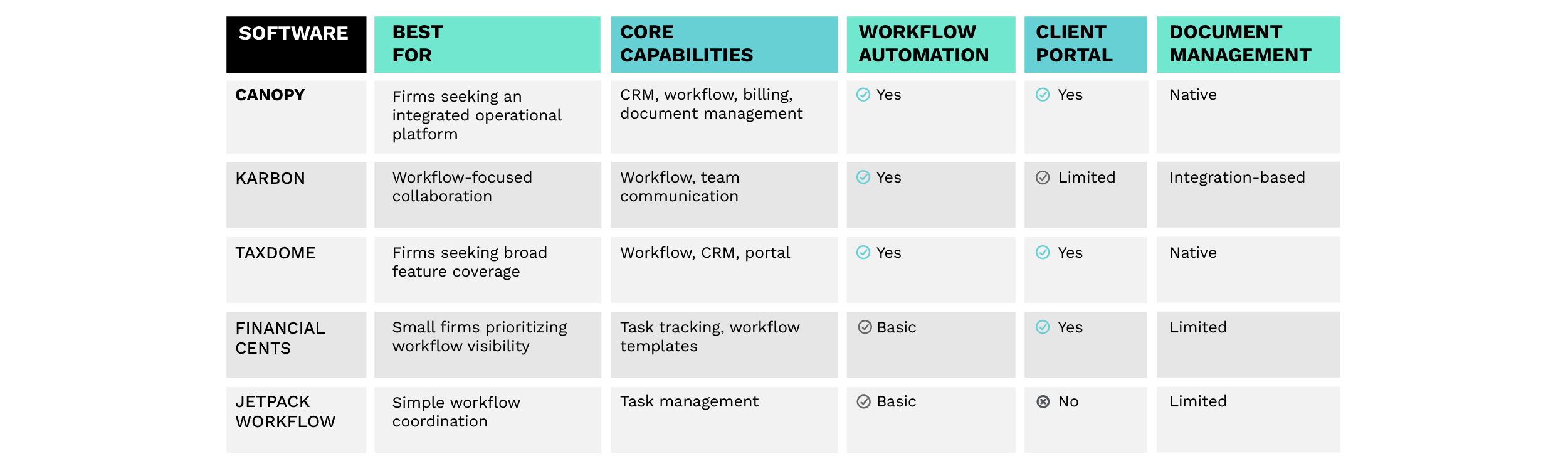
This table provides a simplified view of how some platforms differ in scope and capabilities.
Individual platforms may offer additional features or integrations depending on configuration.
How to Implement Accounting Practice Management Software
Implementing a new platform requires planning to ensure a successful rollout.
Step 1: Map your current processes
Document how work currently moves through your firm.
Understanding these workflows helps determine how they should be configured in a new system.
Step 2: Identify workflow bottlenecks
Look for areas where work frequently slows down or requires manual coordination.
These bottlenecks often represent opportunities for automation.
Step 3: Consolidate your tech stack
Evaluate which existing tools may be replaced or integrated with the new platform.
This step helps reduce unnecessary complexity.
Step 4: Configure workflows and templates
Most practice management platforms allow firms to create templates for recurring processes.
Setting up these templates early helps ensure consistency across teams.
Step 5: Train your team
Training is critical for adoption.
Provide clear documentation and training sessions so staff understand how to use the system effectively.
Step 6: Measure operational improvements
After implementation, track metrics such as:
- Workflow completion time
- Client response time
- Staff utilization
These metrics help determine whether the new system improves operational efficiency.
The Future of Accounting Practice Management Software
Practice management software continues to evolve as accounting firms adopt new technologies and operating models.
AI and workflow automation
Artificial intelligence is beginning to automate administrative tasks such as drafting messages, categorizing documents, and generating workflow actions.
Tech stack consolidation
Many firms are moving away from fragmented collections of tools toward integrated platforms.
Consolidating systems can reduce operational complexity.
Client experience as a competitive advantage
Client portals, digital communication tools, and automated document collection are becoming increasingly important in delivering modern client experiences.
Practice management as the firm operating system
As accounting firms grow, practice management software increasingly acts as the central system coordinating operations across the firm.
Frequently Asked Questions
What is accounting practice management software?
Accounting practice management software is a platform that helps accounting firms manage operations such as workflows, client communication, document storage, billing, and reporting.
What features should accounting practice management software include?
Most platforms include workflow management, CRM functionality, document management, client portals, and reporting tools.
What is the best accounting practice management software?
The best platform depends on factors such as firm size, workflow complexity, and integration requirements. Different platforms offer different strengths.
Do small accounting firms need practice management software?
Smaller firms may manage work manually at first, but many adopt practice management platforms as workloads grow and operational complexity increases.
How long does implementation take?
Implementation timelines vary depending on the platform and the firm's complexity. Many firms complete initial rollout within several weeks, followed by ongoing workflow refinement.
Ready to learn more about Canopy?


Get Our Latest Updates and News by Subscribing.
Join our email list for offers, and industry leading articles and content.